The product, in three screens
Ask. Work it. Send it.
Real screens from the Slack app, not mockups. A rep asks in plain English, works the sheet right from a thumb, and sends a branded PDF without ever leaving the thread.
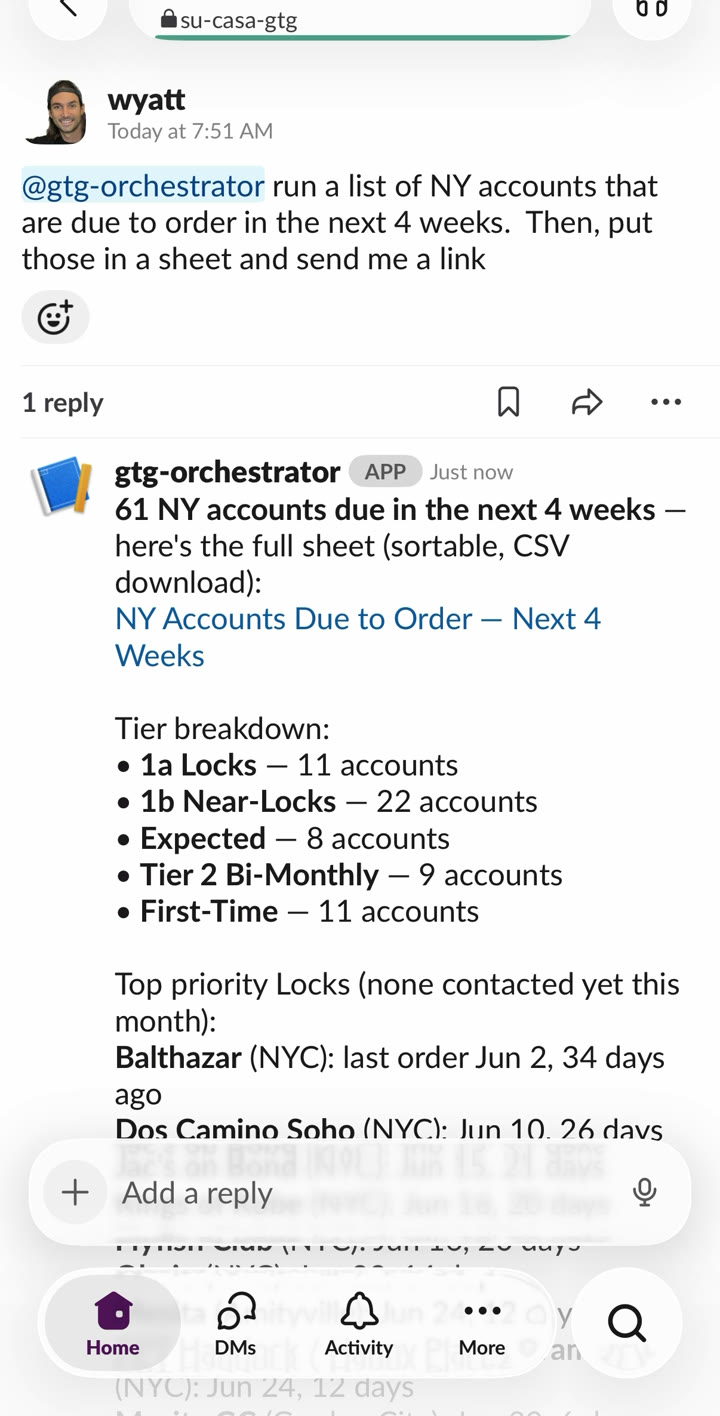
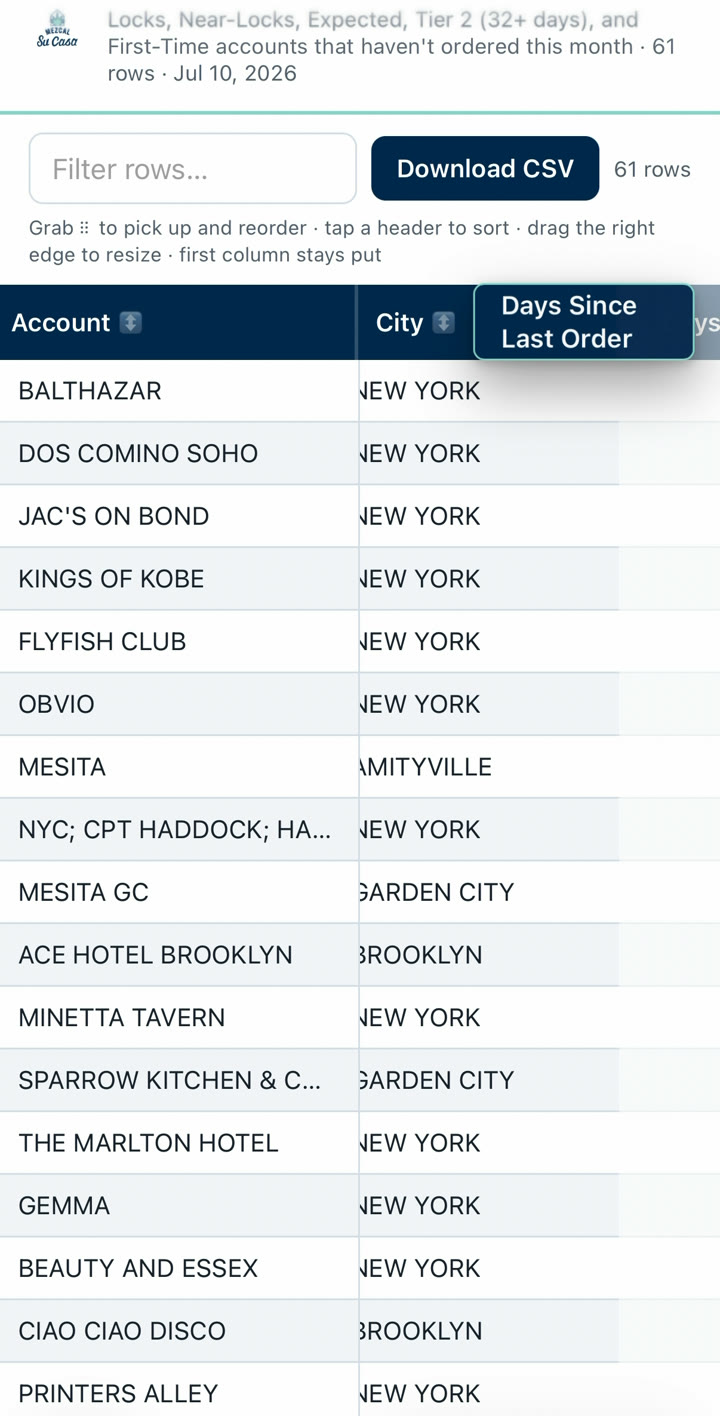
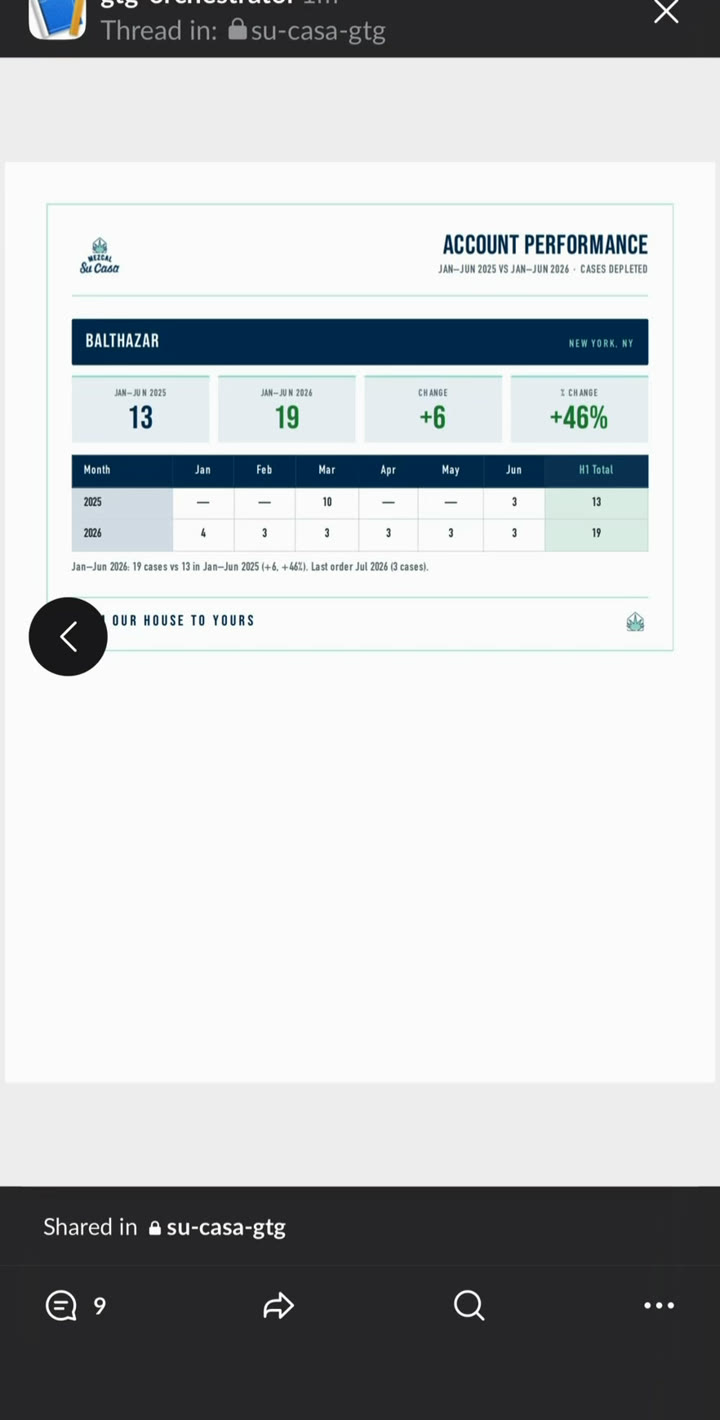
Anyone on your team just asks, in plain English, right in Slack. Nobody runs a report, nobody waits. It scores every account, catches the ones slipping before they go dark, and traces every number back to its source.
Real screens from the Slack app, not mockups. A rep asks in plain English, works the sheet right from a thumb, and sends a branded PDF without ever leaving the thread.
The data you have is scattered, duplicated, and weeks out of date. Even your internal tool gets about half of it wrong: wrong SKU, wrong timeframe, geographies blended together. By the time the numbers are clean, the account is already gone.
The win is not a faster report. It is that the report goes away. When the answer is one message, the whole team's relationship to its own data changes.
One question used to mean two people. Someone logs into the system, runs it, filters it, screenshots it, sends it back. Now your team just asks in Slack and the answer comes back on its own. Your best people stop being the human query engine, and whoever needed the number never has to wait on anyone.
When an answer costs thirty seconds instead of a favor and a wait, people ask the questions they used to let slide. The quick hunch gets checked. The account that is quietly slipping gets caught, because someone actually looked. Cheap answers mean more of them, and more caught while you can still do something about it.
The same pattern sits under every workflow we build. Get the data in, structure it so it is trustworthy, let the system reason over it, and turn that into saved time and recovered revenue.
Your sales feed reaches us by secure transfer on a daily schedule. No reports to run, no new habits for your team.
It lands in your own isolated database. We pre-calculate the breakdowns and lock in your definitions, so answers come from exact tables.
Ask anything in plain English. Churn and velocity get scored on your terms. Slipping accounts are flagged before they go dark.
A data event reaches the rep who can act on it in under 60 seconds, on desktop or phone. The loop closes with a recovered order.
Anyone with access asks a question in plain English and gets an answer in seconds. No reports to run, no analyst in the middle.
"What accounts are down this month in New York?" "Which monthly buyers have not ordered yet?" Answers in seconds.
The system scores accounts on your terms. It knows what locked and slipping mean to you, and flags the ones slowing down.
Cases per month, period over period, same accounts this year versus last. The metrics your team uses, defined your way.
Turn any answer into a clean, branded one-pager a rep can send straight to a buyer.
A rep names where they are, like zip code 10011, and gets the accounts nearby and which ones are slipping, from their phone.
It pulls fresh sales data on the schedule you set. Nobody has to remember to update anything.
Ranked from the live question log: every question field reps have asked the bot over the last three months, grouped by type. Each screen shows the ask and what comes back, right in the thread.
Short pages, one per feature or use case, each led by a real demo. New ones get added as they ship.
Open your phone to five priorities every morning: accounts due to order, win-backs with dollars at stake, and one wildcard. Tap for the full picture, make contact, mark the win.
Watch the 55-second demo →
Ask for a sheet, sort and search it right on your phone, then turn any answer into a branded one-pager on the spot.
Watch the 43-second demo →A single source of truth, a structured pipeline, automated capture, a layered and auditable architecture, and monitoring so a feed never fails in silence.
Every venue resolves to one account
The pipeline always knows the next move
Every channel captured automatically
Raw data in, trusted data out
Decisions from evidence, not gut
The platform is new. The engine underneath it is proven: we run it on our own brands every day, on real sales data. Not a black box. A working system, and a team that keeps it sharp.
Wrong SKU, wrong timeframe, blended geographies, answers that sound right and are not: they all trace to the same root cause. A general model guessing at what your terms mean, reasoning over raw rows. The fix is structural.
Breakdowns by state, period, account, SKU, and category are pre-calculated. An answer comes from a small exact table, not a live read across millions of rows.
Velocity, lock, slipping, physical case versus nine-liter case. Every term is calculated in the database and handed to the assistant as a fixed reference. It reads the math, it does not guess it.
We generate a full-size simulated copy at your row count, on the order of a hundred million rows, and load-test against it. We find the breaking points before your team ever does.
Monitoring every run for accuracy, tuning definitions, adding new metrics and new markets as you grow. A named team that knows your business, not a ticket queue.